






























Many of us experienced it firsthand. The kitchen table became our office, or a quiet corner transformed into our command center. During the past year, a significant 70% of full-time workers adapted to working from home. This big shift, while offering new freedoms, also brought challenges. We faced blurred work-life lines, discomfort from makeshift setups, and constant distractions.
Our home workspace is more than just a spot for our laptop. It is a vital engine for our productivity and overall comfort. A well-optimized space can boost focus, prevent physical strain, and help us thrive in our roles.
This extensive guide will show you how to truly optimize your home office. We will explore every detail. This includes selecting the ideal location and choosing ergonomic furniture. We will also cover smart tech upgrades and proven Routine-building desk setups. Our goal is to transform your work area into a powerful tool. It should support your best work, every day.
Choosing the right location for your home workspace is the foundational step in optimization. It’s not just about finding an empty spot; it’s about identifying an area that inherently supports your work style and minimizes interruptions. Whether you have a dedicated spare room or are working with limited square footage, intentional placement makes a significant difference.
For some, a dedicated room is ideal, offering a clear physical separation between work and home life. However, this isn’t always feasible. Many remote workers, for instance, have become adept at repurposing unconventional spaces. In fact, statistics from the past year show that 15% of workers chose closets as their home workspace, demonstrating the ingenuity required in adapting living environments.
When selecting your spot, consider natural light. Positioning your desk near a window, with light coming from the side, can enhance mood and efficiency. Direct light from behind or in front of your screen can cause glare and eye strain. If a window isn’t an option, strategically placed artificial lighting can mimic natural light.
The layout of your chosen space can also influence your cognitive processes. Research suggests a fascinating phenomenon known as the “Cathedral Effect,” where high-ceiling spaces tend to elicit abstract thoughts and creativity. Conversely, low-ceiling environments can promote more detailed, analytical work. Understanding this can help you choose a spot or even arrange your existing space to suit the type of tasks you perform most often.
Maximizing Focus through Home Workspace Optimization
Once a location is chosen, the next step is to design it to maximize focus. This involves creating distraction-free zones and establishing psychological boundaries. Even in a shared space, you can signal when you’re “at work.” This might involve simply putting on headphones, closing a door (if available, even a closet door!), or using a visual cue like a specific desk lamp that’s only on during work hours.
For those in multipurpose rooms, the challenge is greater but not insurmountable. Cleaning up a space before starting work, for example, helps the mind transition into a “work-only” mode. This mental shift is crucial, as our brains associate certain environments with specific activities. By consistently using a space solely for work, you train your brain to enter a state of focus more readily. This intentionality is key to effective Routine-building desk setups.
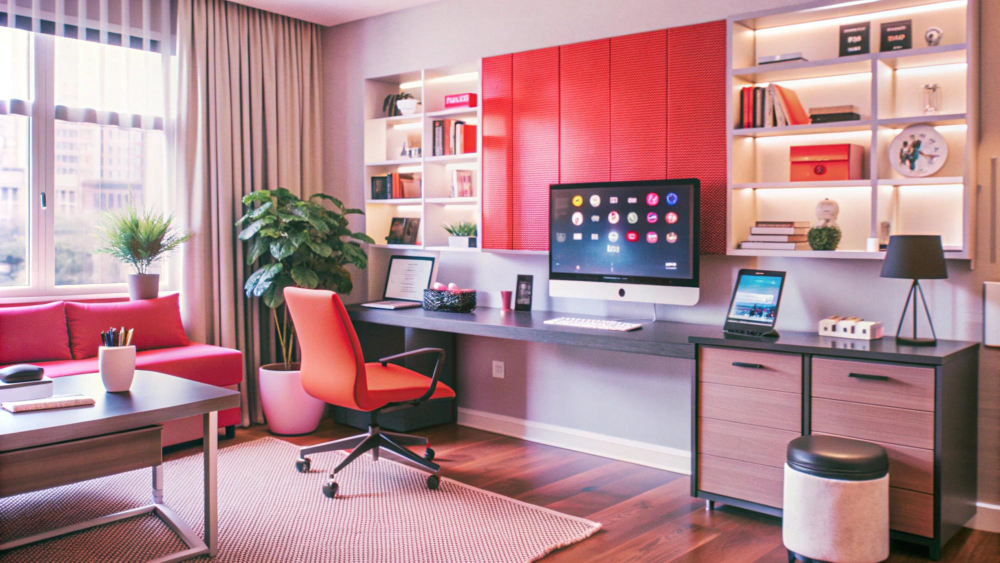
Vertical storage solutions are invaluable for keeping your workspace tidy and functional without expanding its physical footprint. Shelves, wall-mounted organizers, and even pegboards can keep essentials within reach but off your primary work surface. Hideaway desks, which can fold away when not in use, are excellent for small apartments, allowing for a complete separation of work and home life once the workday concludes.
Adapting Small Spaces for Professional Use
Working from a small home or apartment requires creative solutions to maximize functionality. The goal is to create a workspace that is both efficient and flexible.
The key to optimizing a small space lies in its adaptability. Your workspace should serve your needs, not dictate your living arrangements.
Ergonomics and Physical Health in Home Workspace Optimization
Our physical well-being is intrinsically linked to our productivity. A poorly set up workspace can lead to discomfort, pain, and long-term health issues, ultimately hindering our ability to perform. Investing in ergonomic solutions is not a luxury; it’s a necessity for sustainable remote work.
One of the most impactful investments is an ergonomic chair. Studies have shown that employees using ergonomic chairs reported a total increase in productivity of 17.7%. This isn’t just about comfort; it’s about supporting your body in a way that minimizes strain and allows you to maintain focus for extended periods.
When adjusting your chair, ensure your feet rest flat on the floor or on a footrest, with your knees at roughly a 90-degree angle. Your elbows should also form a 90-degree angle when your hands are on the keyboard, and your wrists should remain neutral. Lumbar support is crucial for maintaining the natural curve of your spine, preventing lower back pain.
Equally important is your screen positioning. Your monitor should be at arm’s length (50-70cm) from your eyes, with the top third of the screen at or slightly below eye level. This prevents you from craning your neck or looking down, which can lead to neck and shoulder strain. For comprehensive guidance on setting up a healthy workspace, consider exploring resources on ergonomic home workspace optimization.
Implementing a Sustainable Sit-Stand Routine
Prolonged sitting has been linked to various health issues, but standing all day isn’t necessarily better. The optimal approach, according to experts, is to alternate between sitting and standing. We recommend implementing a routine where you switch positions every 10-30 minutes.
Beyond alternating, incorporating regular movement breaks is vital. The “45-5 rule”—working for 45 minutes, then taking a 5-minute break to move around or look away from your screen—can significantly improve focus and reduce fatigue. During standing periods, an anti-fatigue mat can provide cushioning and encourage subtle movements, further reducing strain.
For those on a budget, affordable DIY standing desk alternatives abound. Stacking sturdy books or using a stable box to elevate your monitor and keyboard on an existing desk can provide a temporary solution.
Reducing Physical Strain and Long-Term Injury
Beyond general discomfort, poor ergonomics can lead to specific long-term injuries like Carpal Tunnel Syndrome. This condition, affecting the wrist and hand, can be debilitating. Fortunately, implementing ergonomic office accessories can significantly lower risk levels. A study showed that 44% of participants lowered their risk for Carpal Tunnel Syndrome after integrating such accessories.
For more in-depth advice on safeguarding your health while working remotely, consulting resources focused on ergonomic home workspace optimization is highly recommended.
Environmental Factors: Lighting, Sound, and Biophilia
Our surroundings play a profound role in our mood, focus, and overall productivity. Beyond the physical setup, optimizing environmental factors like lighting, sound, and even the presence of nature can significantly enhance our workspace.
Biophilia, the human tendency to connect with nature, offers tangible benefits in the workspace. Bringing plants into your home office, for example, can increase productivity by up to 15 percent. They not only improve air quality but also provide a calming visual element that reduces stress and boosts mood.
Lighting is another critical element. Natural light is always preferable, as it positively impacts mental and physical health, and helps regulate our circadian rhythm. When natural light is insufficient, artificial lighting needs to be carefully managed. Bright, blue-rich light (around 5000K-6500K) in the mornings can trigger dopamine and norepinephrine, boosting alertness and focus for analytical tasks. As the day progresses, switching to softer, warmer lights (around 2700K-3000K) can create a more relaxed atmosphere, conducive to creative thinking and problem-solving. Layered lighting—ambient room light combined with a task lamp—is often the most effective approach.
Managing the Acoustic Environment for Concentration
Noise can be a significant distraction in a home environment. However, not all sound is detrimental. The right acoustic environment can actually enhance concentration.
The Role of Personalization and Decluttering
While a minimalist aesthetic is often touted for focus, personalization can also play a motivational role. A few carefully chosen personal items—a meaningful photo, a piece of art, or a small memento—can inspire and comfort. The key is balance.
Visual clutter, however, is a known detractor from focus. It literally competes for neural representation, reducing our working memory capacity. We find the “one rule” helpful: if an item isn’t used daily, it shouldn’t be on your desk. This keeps your primary work surface clear and easy to reset.
Beyond aesthetics, plants, as mentioned, contribute to biophilia and air quality. For beginners or those worried about maintenance, resilient succulents are an excellent choice, adding greenery with minimal effort.
Science-Backed Routines and Psychological Boundaries
Optimizing your home workspace goes beyond physical setup; it extends to how we structure our day and manage our mental state. Science offers insights into leveraging our natural biological rhythms for peak productivity.
Neuroscience suggests that our brains operate in different “phases” throughout the day, influenced by neurochemical levels.
Understanding these phases allows us to align our most demanding tasks with our natural neurochemical peaks, maximizing efficiency.
Psychological Boundaries and Home Workspace Optimization
A challenge of remote work is the blurring of lines between professional and personal life. Establishing clear psychological boundaries is crucial for mental well-being and preventing burnout.
Tech Upgrades for Remote Efficiency
In 2026, technology continues to evolve, offering affordable upgrades that significantly enhance remote work efficiency.
Frequently Asked Questions about Home Workspace Optimization
Optimizing a small apartment workspace hinges on maximizing vertical space and choosing flexible furniture. Consider wall-mounted shelving, pegboards, and monitor arms to keep your desk clear. A compact ultrawide monitor can replace a dual-screen setup without taking up as much physical space. Foldable or hideaway desks are excellent for reclaiming living areas when not working. The key is multi-functionality and a commitment to tidiness.
Without a doubt, the most important ergonomic investment is a high-quality, adjustable ergonomic chair. It directly impacts your posture, reduces back and neck pain, and significantly contributes to your long-term comfort and productivity. While other accessories are beneficial, a good chair provides foundational support that prevents many common work-related ailments.
Lighting profoundly affects your alertness, mood, and circadian rhythm. Natural light is ideal, boosting happiness and efficiency. For artificial lighting, bright, cool-toned light (like daylight) in the morning can enhance alertness and focus for analytical tasks. As the day progresses, transitioning to warmer, softer light can support creative thinking and prepare your body for winding down. Poor lighting, such as glare or dim conditions, can lead to eye strain, headaches, and fatigue, directly reducing productivity.
Conclusion
Optimizing your home workspace is an ongoing journey, not a one-time fix. It involves a thoughtful integration of physical setup, environmental factors, and science-backed routines. By focusing on ergonomics, managing your environment, and establishing clear boundaries, we can transform our home offices from makeshift solutions into powerful engines for productivity and well-being.
The goal isn’t a perfect setup, but one that continuously evolves to support your best work. Small, consistent improvements often yield the most significant returns. Prioritizing your physical comfort and mental focus through careful ergonomic home workspace optimization is an investment that pays dividends in both your professional output and your overall quality of life. Embrace the flexibility of remote work by designing a space that truly works for you.