





















































































Understanding Your E-Verify Support Options
by Ankita Tripathy Blog 13 September 2025

Understanding the E-Verify system is essential for both employers and employees, but navigating it isn’t always straightforward. From account access problems to Tentative Nonconfirmations and compliance questions, unexpected issues can arise at any stage.
That’s where E-Verify’s customer support comes in—offering clear guidance, timely troubleshooting, and reliable resources to keep the employment eligibility verification process running smoothly. With dedicated support channels tailored to employers, employer agents, and employees, users can access the right help for their specific needs—whether it’s a password reset, case clarification, or questions about rights and responsibilities.
By knowing your support options in advance, you can save time, prevent delays, and approach employment verification with confidence
Understanding Your E-Verify Support Options
Navigating the intricacies of employment eligibility verification can sometimes lead to questions or unexpected problems. Fortunately, E-Verify provides a robust customer support system to assist employers, employer agents, and employees. Understanding the various channels and the types of inquiries each is best suited for is the first step toward efficient resolution.
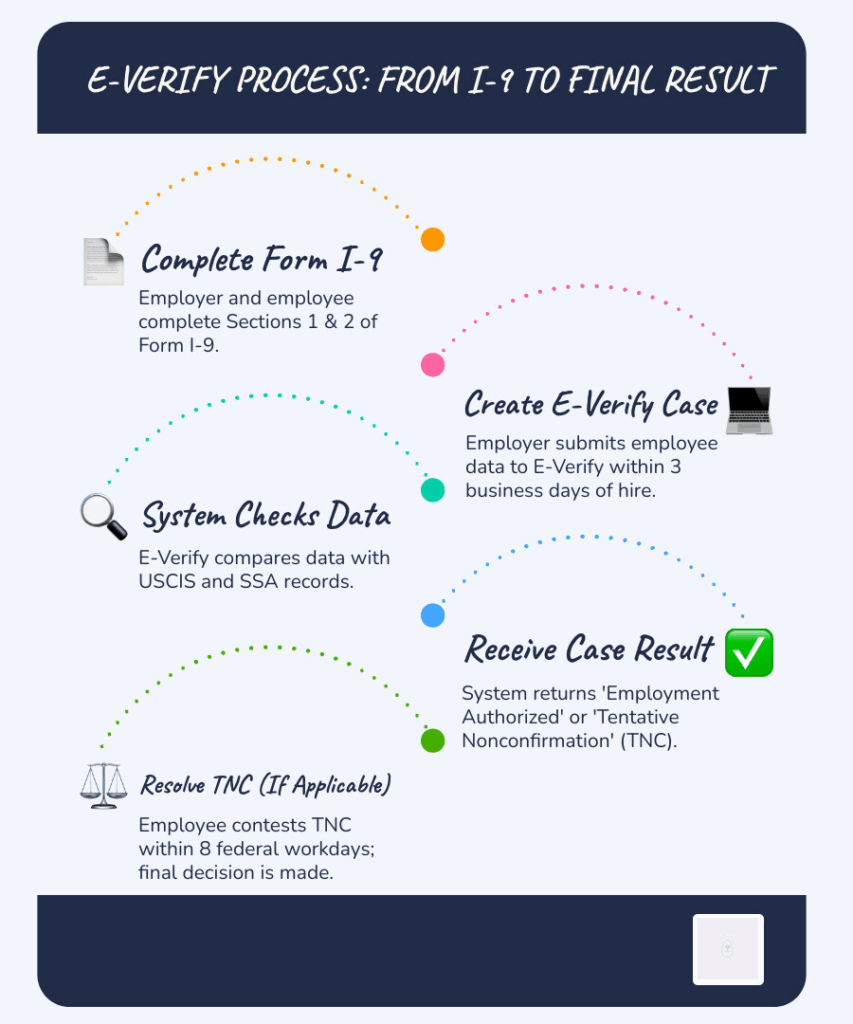
E-Verify customer support offers comprehensive assistance, covering everything from technical glitches and system outages to policy interpretations and case-specific guidance. Whether you’re dealing with a login issue, a Tentative Nonconfirmation (TNC), or need clarification on a Form I-9 procedure, there’s a dedicated pathway to help.
For Employers And Employer Agents
As an employer or an authorized employer agent, your responsibilities within the E-Verify system are extensive. Consequently, your support needs can be varied. We often find that employers reach out for assistance with:
- Password Resets and Account Access: Locked out of your account? Forgotten your password? Customer support can guide you through the recovery process, which is often tied to the Login.gov integration.
- Case Inquiries and Status Updates: Questions about a specific E-Verify case, its status, or how to interpret a result (e.g., “Employment Authorized,” “Tentative Nonconfirmation,” “Final Nonconfirmation”).
- Compliance Questions: Clarification on E-Verify policies, federal and state mandates, or best practices for maintaining employment eligibility verification requirements compliance.
- Technical Errors and System Outages: Issues with the E-Verify website, software malfunctions, or general system unavailability that prevent you from processing cases.
- Form I-9 Guidance: While E-Verify focuses on the digital verification, support can often provide general guidance on how the E-Verify process interacts with the Form I-9, Employment Eligibility Verification.
For Employees
E-Verify is not just for employers; employees can access dedicated support channels and resources, particularly through the myE-Verify portal. Common reasons employees might seek assistance include:
- Tentative Nonconfirmation (TNC) Resolution: Understanding what a TNC means, how to resolve it, and what steps to take if their information doesn’t initially match government records.
- myE-Verify Portal Assistance: Help access their myE-Verify account, navigate its features, or troubleshoot issues within the portal.
- Employee Rights and Responsibilities: Questions about their rights during the E-Verify process, what employers are allowed or not to do, and how to protect their personal information.
- Case Status Tracking: Employees can use myE-Verify to track the status of their E-Verify case initiated by an employer.
- Self-Lock Feature: Guidance on using the Self-Lock feature to protect their Social Security number from fraudulent use within E-Verify.
Your Direct Line To E-Verify Customer Support
When self-service options aren’t enough, or you need direct assistance, E-Verify provides live support through various channels. Knowing the correct contact information and operating hours is crucial for a smooth experience.
Key Contact Information For E-Verify Customer Support
E-Verify customer support offers FREE live assistance to ensure all users can get help. Here’s a quick reference guide:
- Employer Phone: 888-464-4218
- Employee Phone: 888-897-7781
- Email: E-Verify@uscis.dhs.gov (for general inquiries)
- TTY Line (for hearing/speech impaired): 877-875-6028
- International Callers: 1-571-293-7538
Operating Hours: Live assistance is available Monday through Friday, from 8:00 a.m. EST to 5:00 p.m. local time, except on federal holidays. For technical support, the hours extend slightly, typically from 8:00 a.m. to 8:00 p.m. Eastern time. Confirming the most current hours on the official E-Verify website is always a good idea before calling.
How To Prepare For Your E-Verify Customer Support Interaction
To expedite your support experience, we highly recommend preparing certain information before you contact E-Verify customer support. These readily available details will allow the representative to understand your issue and provide accurate assistance quickly.
- Your E-Verify Company ID Number: This unique identifier helps the support team locate your employer account.
- E-Verify Case Number(s): The case number is essential if your inquiry relates to a specific employee’s verification.
- Employee Information: Be prepared to provide the employee’s name, birth date, and other relevant identifying details.
- Form I-9 Details: Have the completed Form I-9 handy, as it contains critical information that might be needed to troubleshoot discrepancies.
- Specific Error Messages: If you encountered an error, note the exact error message or code. Screenshots can also be beneficial if you’re communicating via email.
- Details of the Issue: Clearly describe the problem you’re experiencing, including when it started, what steps you’ve already taken, and what outcome you expect.
Solving Common Problems Before You Call
While E-Verify customer support is readily available, many common issues can be resolved using the extensive self-service resources provided. Leveraging these tools can save you time and allow for immediate resolution of your concerns.
Using Self-Service Tools to Avoid a Call
E-Verify and USCIS offer a wealth of online resources designed to empower users to find answers independently. We encourage you to explore these options first:
- MyE-Verify Portal: This portal is a powerful tool for employees. It allows you to check the status of your E-Verify case, upload documents if requested, and even protect your identity using the Self Lock feature. It’s a central hub for managing your employment eligibility information.
- Self Check: This feature allows individuals to confirm their employment eligibility before applying. It’s a proactive way to identify and correct data mismatches with government records.
- E-Verify User Manuals and Quick Reference Guides: The official website hosts comprehensive user manuals for employers, employer agents, and federal contractors. These guides provide step-by-step instructions for various processes, from creating a case to handling Tentative Nonconfirmations.
- Online FAQs: The E-Verify website also features an extensive Frequently Asked Questions section covering various topics, including enrollment, system requirements, case processing, and compliance.
Solving Login.gov and MFA Problems
A significant improvement to E-Verify access involves its integration with Login.gov. This change aims to bolster security through multi-factor authentication (MFA), but it can sometimes be a source of user questions.
- Login.gov Account Creation: Each E-Verify user must have a unique email address for their Login.gov account. This account serves as a secure gateway to E-Verify and other government services.
- Password Reset: If you forget your Login.gov password, you can initiate a reset directly through the Login.gov portal. E-Verify customer support cannot reset your Login.gov password directly.
- Adding Authentication Methods: Login.gov strongly recommends adding at least two authentication methods (e.g., authenticator app, security key, backup codes) to prevent being locked out. This redundancy is a best practice for account security.
- Login.gov Help Center: For all issues related to your Login.gov account, including MFA setup, lost devices, or general access problems, the Login.gov Help Center is your primary resource. It offers detailed guides and troubleshooting steps.
For businesses seeking to bypass these complexities and streamline their entire E-Verify process, expert E-Verify processing can manage the whole workflow, from Form I-9 review to case submission and compliance, reducing the administrative burden on your team.
Beyond E-Verify: Who To Contact For Discrimination Concerns
E-Verify customer support primarily handles technical and procedural questions related to the system. If you encounter or suspect employment discrimination, particularly associated with the E-Verify process or your immigration status, you must contact different federal agencies.
Immigrant and Employee Rights Section (IER)
The U.S. Department of Justice (DOJ) Civil Rights Division’s Immigrant and Employee Rights Section (IER) is responsible for enforcing the anti-discrimination provisions of the Immigration and Nationality Act (INA). We encourage individuals and employers to contact IER if they have questions or concerns about:
- Discrimination in Forms I-9 and E-Verify Process: This includes discrimination based on citizenship status or national origin during hiring, firing, or recruitment.
- Document Abuse: Situations where employers request more or different documents than required for Form I-9, or refuse to accept valid documents.
- Retaliation: If an individual is penalized for asserting their rights under the INA’s anti-discrimination provisions.
IER Contact Information:
- IER Hotline: 800-255-8155 (employers and job seekers)
- TTY: 800-237-2515
- Email: ier@usdoj.gov
- Website: http://www.justice.gov/ier
IER offers free interpreter services and can assist in multiple languages.
Equal Employment Opportunity Commission (EEOC)
The Equal Employment Opportunity Commission (EEOC) is a federal agency that enforces laws prohibiting employment discrimination based on race, color, religion, sex (including pregnancy, gender identity, and sexual orientation), national origin, age (40 or older), disability, or genetic information. While IER focuses on immigration-related discrimination, the EEOC handles broader discrimination complaints.
If your discrimination concern does not explicitly relate to citizenship status or the E-Verify/Form I-9 process, but instead falls under one of the other protected characteristics, the EEOC is the appropriate agency to contact.
EEOC Contact Information:
- EEOC Hotline: 800-669-4000
- TTY: 844-234-5122
- Website: www.eeoc.gov
Frequently Asked Questions About E-Verify Customer Support
To further assist you, we’ve compiled answers to some of users’ most common questions about E-Verify customer support.
What are the most common reasons to contact E-Verify support?
Based on our experience and the information provided by E-Verify, the most frequent reasons users reach out to customer support include:
- Tentative Nonconfirmations (TNCs) and Final Nonconfirmations (FNCs): Users often need guidance on how to process these, understand their reasons, or resolve discrepancies.
- Technical Errors or System Outages: Issues preventing access to the system, case creation, or data submission are standard drivers for support calls. This can include problems with the Login.gov integration.
- Password Resets and Account Access: Locked or forgotten passwords are a consistent reason for contacting support, especially for employer accounts.
- Questions about Case Status or System Procedures: Users frequently call for updates on pending cases or clarification on specific steps within the E-Verify process, such as photo matching or driver’s license verification.
- Compliance and Policy Clarification: Employers often seek to ensure they are following all E-Verify rules and regulations correctly.
How long does it take to get a response via email?
The standard response time for email inquiries to E-Verify customer support is two federal government working days. While they strive to meet this target, you may be notified if a longer delay is expected, especially during high volume or system-wide issues. For urgent matters, calling the appropriate phone line is generally recommended.
Can E-Verify customer support help me with a discrimination complaint?
No, E-Verify customer support is equipped to handle technical issues, procedural questions, and case-specific inquiries related to the E-Verify system and Form I-9. They are not authorized to assist with or investigate discrimination complaints.
If you have any concerns related to employment discrimination, particularly those involving citizenship status or national origin in the hiring process (including Form I-9 and E-Verify), you must contact the U.S. Department of Justice’s Immigrant and Employee Rights Section (IER).
For broader employment discrimination issues (e.g., based on race, sex, age, or disability), the Equal Employment Opportunity Commission (EEOC) is the appropriate agency. We have provided their contact details in the “Beyond E-Verify” section above.
Read Also:







Related


Blog
Is It Time To Add A Vehicle To Your Business? Key Considerations
by Arnab Dey 26 September 2025